
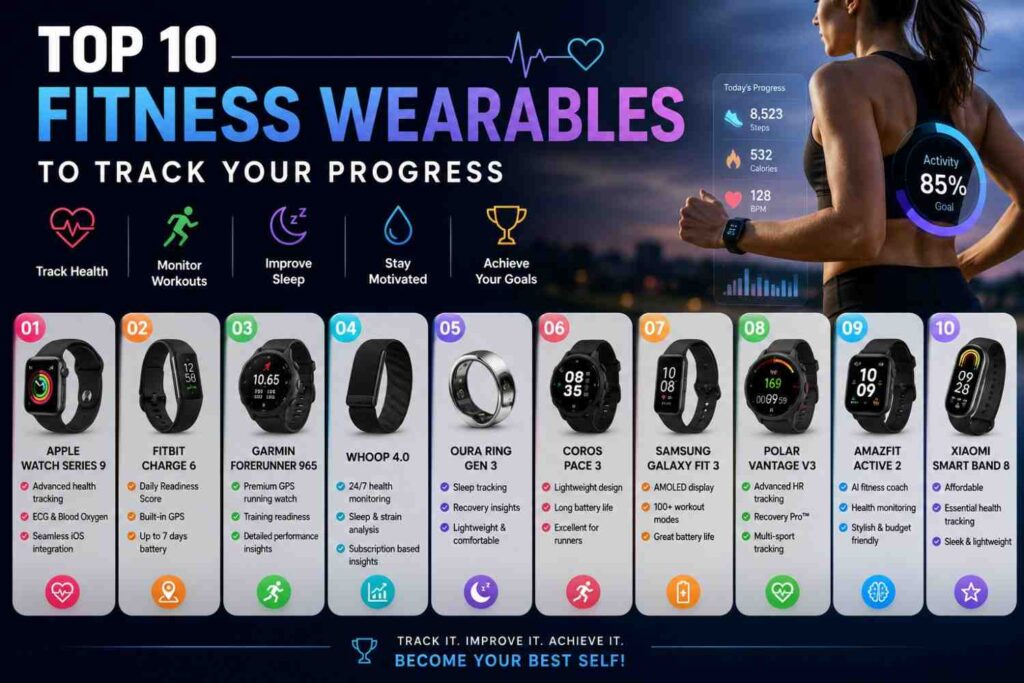
Fitness wearables are no longer just step counters. Today, they help people track workouts, sleep, heart rate, recovery, GPS distance, training load, active minutes, and long-term health patterns. That is why many people search for the Top Fitness Wearables to Track Your Progress before choosing a device.
In my experience, the best wearable is not always the most expensive one. The right device is the one that fits your routine. A runner may need GPS and training load. A beginner may need simple steps, sleep, and heart rate tracking. Someone focused on recovery may prefer a smart ring or screen-free band.
Health organizations such as the CDC and WHO recommend regular weekly activity, including aerobic exercise and muscle-strengthening activity. A wearable can help you follow those goals by showing what you actually do each day. It will not do the work for you, but it can make your progress easier to measure.
Why Fitness Wearables Matter for Progress Tracking
Fitness progress becomes easier when you can see clear patterns. Without tracking, many people guess their activity level, sleep quality, or workout consistency. A wearable gives you a daily record, which helps you make better decisions. This is the main reason fitness trackers and smartwatches for fitness have become popular among beginners, athletes, and health-conscious users.
A good wearable can show whether you are moving enough, training too hard, sleeping poorly, or improving over time. It can also help you stay accountable. Instead of relying on motivation only, you can use real data to build a routine that fits your lifestyle.
They Make Daily Activity Easier to Understand
Most people underestimate how much they sit and overestimate how much they move. Fitness wearables solve this problem by tracking steps, active minutes, calories burned, and daily movement patterns. These numbers are not perfect, but they give you a useful picture of your normal routine.
For example, if your step count is low on workdays, you can add a short walk after lunch. If your active minutes drop on weekends, you can plan a light workout. Small changes become easier when the data is visible.
They Help You Track Workout Consistency
Consistency is one of the biggest parts of fitness progress. A workout tracker can show how often you train, what type of workout you complete, and how your routine changes over time. This is useful for gym workouts, running, cycling, walking, swimming, and home training.
One thing I always check first is weekly consistency. If someone trains once one week and five times the next, progress may be harder to measure. A wearable helps you build a more stable pattern by showing your weekly activity history.
They Give Better Insight Into Recovery
Progress does not only happen during workouts. It also depends on sleep, rest, stress, and recovery. Wearables such as Oura Ring, WHOOP, Garmin, Fitbit, and Apple Watch can help users notice recovery trends through sleep tracking, resting heart rate, readiness scores, or recovery insights.
This can help you avoid overtraining. If your sleep is poor and your recovery score is low, you may choose a lighter session instead of pushing hard. That is how data can support smarter training.
Best Types of Fitness Wearables to Consider
There are several types of fitness wearables, and each one serves a different purpose. Before buying, it is important to understand the difference between a smartwatch, fitness band, GPS running watch, smart ring, and recovery tracker. This helps you avoid paying for features you do not need.
The Top Fitness Wearables to Track Your Progress are not all designed for the same person. Some are made for daily wellness. Some are made for serious training. Others are made for sleep and recovery. The best option depends on your goal, phone, budget, and comfort preference.
Smartwatches for Everyday Fitness and Health
Smartwatches are the most versatile option. Apple Watch and Samsung Galaxy Watch are good examples. They can track workouts, heart rate, sleep, notifications, calls, apps, and daily activity. Apple’s current Watch lineup includes Apple Watch Series 11, Apple Watch SE 3, and Apple Watch Ultra 3, according to Apple’s official Watch page.
Smartwatches are best for people who want fitness tracking plus lifestyle features. If you want one device for exercise, messages, music, safety tools, and health data, a smartwatch is a strong choice.
Fitness Bands for Simple Progress Tracking
Fitness bands are usually lighter, simpler, and easier for beginners. Fitbit Charge 6 is a good example of a compact fitness tracker. Google lists Fitbit Charge 6 as a tracker for heart rate, steps, exercise routines, and daily activity support.
A fitness band is a good choice if you do not need a full smartwatch. It works well for users who want to track steps, workouts, sleep, and heart rate without too many distractions.
GPS Running Watches for Serious Training
A GPS running watch is best for runners, cyclists, hikers, and endurance athletes. Garmin is one of the strongest brands in this category. Garmin’s running watches focus on GPS, pace, distance, training plans, recovery, and performance metrics.
If your main goal is running progress, I recommend choosing a wearable with strong GPS tracking, heart rate zones, battery life, and training analysis. These features are more useful for runners than general smartwatch apps.
Top Fitness Wearables Comparison Table
A comparison table makes it easier to choose the right device based on your goal. Instead of asking which wearable is “best” overall, it is better to ask which one fits your training style. Top Fitness Wearables to Track Your Progress should help you take action, not just collect data.
The table below compares popular wearable categories and their best use cases. This keeps the article useful for beginners, gym users, runners, Android users, iPhone users, and recovery-focused users.
| Wearable | Best For | Key Strengths | Good Choice For |
|---|---|---|---|
| Apple Watch Series 11 | iPhone users | Workout tracking, heart rate, health metrics, apps | Everyday fitness and lifestyle |
| Apple Watch Ultra 3 | Outdoor and advanced users | Larger display, longer battery than standard models, sports features | Adventure, running, hiking |
| Garmin Forerunner | Runners and athletes | GPS, training load, pace, recovery insights | Running and endurance training |
| Fitbit Charge 6 | Beginners and casual users | Simple tracking, heart rate, exercise modes | Daily activity and wellness |
| Samsung Galaxy Watch | Android users | Samsung Health, workouts, sleep, heart data | Android fitness tracking |
| Oura Ring | Sleep and recovery | Sleep, readiness, stress, activity scores | Recovery-focused users |
| WHOOP 5.0 | Performance and recovery | Strain, recovery, sleep, VO2 max, coaching | Athletes and high performers |
| Polar Loop | Screen-free tracking | 24/7 heart rate, sleep, activity, no screen | Minimalist users |
Best Overall Fitness Wearable for Most Users
For most users, the best overall choice depends on phone ecosystem. Apple Watch is usually best for iPhone users because it connects deeply with Apple services. Samsung Galaxy Watch is a strong option for Android users, especially those already using Samsung Health.
These devices are good because they combine workout tracking with smart features. You can track fitness while also using reminders, notifications, music, and app support.
Best Fitness Tracker for Beginners
For beginners, Fitbit Charge 6 is a practical option. It is smaller than most smartwatches and focuses on useful basics such as heart rate, steps, workouts, and activity tracking. It is easier to understand than many advanced sports watches.
A beginner should not start with too many metrics. I recommend tracking steps, workouts, active minutes, sleep duration, and resting heart rate first. Once the habit is strong, advanced metrics can be added later.
Best Wearable for Sleep and Recovery
Oura Ring and WHOOP are strong choices for sleep and recovery tracking. Oura focuses on sleep, readiness, stress, and activity insights. WHOOP focuses on sleep, strain, recovery, VO2 max, and personalized coaching.
These wearables are useful if you train often or feel tired even after resting. They help you understand whether your body is ready for hard training or needs a lighter day.
How to Choose the Right Fitness Wearable
Choosing from the Top Fitness Wearables to Track Your Progress becomes much easier when you start with your real goal. Many buyers make the mistake of choosing the device with the most features. A better approach is to choose the wearable that solves your main fitness problem.
If you want to walk more, you need simple activity tracking. If you want to run faster, you need GPS and training metrics. If you want better sleep, you need strong sleep insights. If you want fewer distractions, a screen-free wearable may be better.
Start With Your Main Fitness Goal
Before buying, ask yourself one clear question: What do I want to improve first? Your answer should guide your choice.
If your goal is general health, choose a smartwatch or fitness band. If your goal is running performance, choose Garmin or another GPS running watch. If your goal is sleep and recovery, choose Oura or WHOOP. If your goal is simple daily tracking, Fitbit or Polar Loop may be enough.
Check Phone Compatibility and App Support
Your phone matters. Apple Watch works with iPhone. Samsung Galaxy Watch works best with Android and Samsung Health. Garmin users rely on Garmin Connect. Fitbit users use the Google Health/Fitbit app. Oura and WHOOP also depend heavily on their mobile apps.
This is important because the app is where you review trends. A wearable with poor app support can become frustrating. Always check whether the device works well with your phone before buying.
Think About Battery Life and Comfort
Battery life and comfort affect daily use. A wearable is only useful if you wear it often. If it feels heavy, irritates your wrist, or needs charging too often, you may stop using it.
Smart rings and screen-free bands can be more comfortable for sleep. Sports watches often have longer battery life. Smartwatches may need more frequent charging because they have bright displays and more apps.
Important Fitness Metrics to Track
Fitness wearables can show many numbers, but not every metric matters for every user. The goal is to focus on data that helps you take action. In my experience, simple metrics used consistently are more powerful than advanced metrics ignored after one week.
The best fitness wearables should help you understand movement, effort, recovery, and progress. Start simple, then add more detailed numbers as your fitness improves.
Steps, Active Minutes, and Workout Frequency
Steps and active minutes are useful for general health. They show whether you are moving enough throughout the day. Workout frequency shows whether you are training consistently.
For most beginners, these are the best starting metrics. If you can increase movement and train regularly, you are already building a strong foundation.
Heart Rate Zones and Workout Intensity
Heart rate zones help you understand exercise intensity. The American Heart Association explains that moderate activity is usually around 50–70% of maximum heart rate, while vigorous activity is around 70–85%.
A heart rate monitor watch can help you stay in the right zone. This is useful for running, cycling, HIIT, cardio machines, and endurance training.
Sleep, Recovery, and Readiness Scores
Sleep tracking wearables help you review sleep duration, sleep timing, and sleep trends. Some devices also provide recovery or readiness scores. These scores are not medical diagnoses, but they can help you understand how your body is responding.
If your sleep is poor for several nights, your performance may drop. A recovery tracker can help you adjust your training before fatigue builds up.
Step-by-Step Guide to Using a Fitness Wearable Properly
Buying a wearable is only the first step. To get real value, you need to use it correctly. Many people stop using fitness trackers because they check too many numbers and do not create a simple tracking routine.
A better method is to start with a baseline, set realistic goals, review weekly trends, and make small improvements. This turns the wearable into a practical fitness tool instead of another gadget.
Step 1: Set Your Baseline
Wear the device for one to two weeks without making major changes. Track your normal steps, sleep, workouts, resting heart rate, and active minutes. This gives you a realistic starting point.
A baseline is important because it shows where you are now. Without it, you may set goals that are too hard or too easy.
Step 2: Choose Three Core Metrics
Do not track everything at once. Choose three metrics based on your goal. For example, a beginner may track steps, sleep, and workout days. A runner may track distance, pace, and heart rate zones. Someone focused on recovery may track sleep, resting heart rate, and readiness.
This keeps the process simple. You can always add more metrics later.
Step 3: Review Weekly Trends
Daily changes can be affected by stress, weather, poor sleep, travel, or a hard workout. Weekly trends are more useful. Review your data once a week and ask what improved, what dropped, and what needs attention.
This habit makes the wearable more valuable. You stop reacting to every daily score and start making better long-term decisions.
Common Mistakes to Avoid With Fitness Wearables
Fitness wearables are helpful, but they can also become confusing if used the wrong way. Many users either ignore the data completely or become too focused on every number. The best approach is balanced and practical.
Top Fitness Wearables to Track Your Progress should support your health goals. They should not create stress, guilt, or unrealistic expectations. Use them as guides, not as perfect judges of your fitness.
Tracking Too Many Metrics Too Soon
A common mistake is trying to track steps, calories, heart rate zones, VO2 max, sleep stages, stress, recovery, training load, and body battery all at once. This can feel overwhelming.
Start with a few useful numbers. Once you understand them, add more advanced metrics only if they help your goal.
Treating Calories Burned as Exact
Calories burned can be helpful as a rough estimate, but it should not be treated as exact. Wearables use sensors and formulas, so results can vary.
Instead of focusing only on calories, track workout consistency, sleep, activity level, and strength progress. These habits are more useful for long-term fitness.
Ignoring How You Feel
Data is useful, but your body still matters. If your wearable says you are ready but you feel exhausted, listen to your body. If your recovery score is low but you feel fine, consider the full picture.
A good fitness routine uses both wearable data and personal awareness.
Download and App Safety Guidance
Most fitness wearables need a companion app. This app stores your activity history, workout data, sleep reports, health insights, and settings. Because this data can be personal, app safety matters.
Always download apps from official sources. Use the Apple App Store, Google Play Store, or the brand’s official website. Avoid random APK files, unofficial download pages, or third-party links that are not connected to the wearable brand.
Use Official App Stores Only
Official app stores reduce the risk of fake apps and unsafe downloads. If you use Fitbit, download the Google Health/Fitbit app from Google Play or the Apple App Store. If you use Oura, WHOOP, Garmin, Samsung Health, or Apple Watch, use their official app sources.
This is especially important because health apps can request access to sensitive data such as location, heart rate, sleep, and activity.
Review Permissions Before You Sync
Before connecting your wearable, check the permissions. Common permissions include Bluetooth, location, notifications, health data, and background activity.
Only allow what you need. For example, GPS location is useful for outdoor running, but it may not be needed for basic indoor workouts. Reviewing permissions helps protect your privacy.
Keep the App and Device Updated
Updates can improve performance, fix bugs, and support new features. Keep your wearable firmware and mobile app updated through official channels.
If a feature stops working, check the official help center before resetting the device. This can save time and prevent data loss.
Frequently Asked Questions
This FAQ section answers common questions users ask before buying or using a wearable. These answers are written for quick understanding and voice-search style results. They also help readers choose the right fitness tracker, smartwatch, GPS running watch, or sleep tracking wearable.
Quick Answer About Top Fitness Wearables to Track Your Progress
The Top Fitness Wearables to Track Your Progress include smartwatches, fitness bands, GPS running watches, smart rings, and recovery-focused bands. Apple Watch is a strong choice for iPhone users. Garmin is better for runners and endurance training. Fitbit Charge 6 is simple for everyday activity tracking. Samsung Galaxy Watch suits Android users. Oura Ring focuses on sleep and readiness. WHOOP is built around recovery, strain, and coaching. The best choice depends on your phone, fitness goal, comfort, battery life, and the health metrics you will actually use every week.
What is the best fitness wearable for tracking progress?
The best wearable depends on your goal. Apple Watch is strong for iPhone users. Garmin is great for runners. Fitbit is simple for beginners. Samsung Galaxy Watch suits Android users. Oura is useful for sleep and readiness. WHOOP is strong for recovery, strain, and performance tracking.
Are fitness trackers accurate for workouts?
Fitness trackers are useful for trends, but they are not perfect. Heart rate, steps, GPS distance, sleep, and calorie estimates can vary by device, fit, movement type, and sensor quality. Use the data to guide habits and progress, not as medical-grade measurement.
Is a smartwatch better than a fitness band?
A smartwatch is better if you want apps, calls, notifications, music, and richer features. A fitness band is better if you want simple tracking, lighter design, and fewer distractions. For beginners, a fitness band is often enough.
Which wearable is best for sleep tracking?
Oura Ring and WHOOP are strong options for sleep and recovery insights. Apple Watch, Garmin, Fitbit, and Samsung Galaxy Watch also include sleep tracking. Choose based on comfort, battery life, app quality, and how clearly the device explains your sleep trends.
Do fitness wearables help with weight loss?
Fitness wearables can support weight loss by tracking movement, workouts, sleep, and consistency. They do not cause weight loss by themselves. Their value is awareness. They help you see whether you are moving enough and staying consistent.
What features should beginners look for in a fitness tracker?
Beginners should look for step tracking, active minutes, workout modes, heart rate tracking, sleep tracking, good battery life, and an easy app. Avoid paying extra for advanced features unless you will actually use them.
What is better for running, Garmin or Apple Watch?
Garmin is usually better for serious running because many Garmin watches focus on GPS, training load, pace, recovery, and endurance metrics. Apple Watch is better if you want strong smartwatch features with good fitness tracking for everyday use.
Conclusion
Fitness wearables can make your progress easier to see, measure, and improve. The Top Fitness Wearables to Track Your Progress include options for every type of user, from beginners to runners, gym users, Android users, iPhone users, and recovery-focused athletes.
Apple Watch is a strong all-round smartwatch. Garmin is excellent for running and endurance training. Fitbit Charge 6 is simple and beginner-friendly. Samsung Galaxy Watch is useful for Android users. Oura Ring and WHOOP are better for sleep, recovery, and readiness insights. Polar Loop is a good screen-free option for users who want quiet tracking.
My recommendation is simple. Choose the wearable that matches your goal and feels comfortable enough to wear daily. The best device is the one you will actually use.